






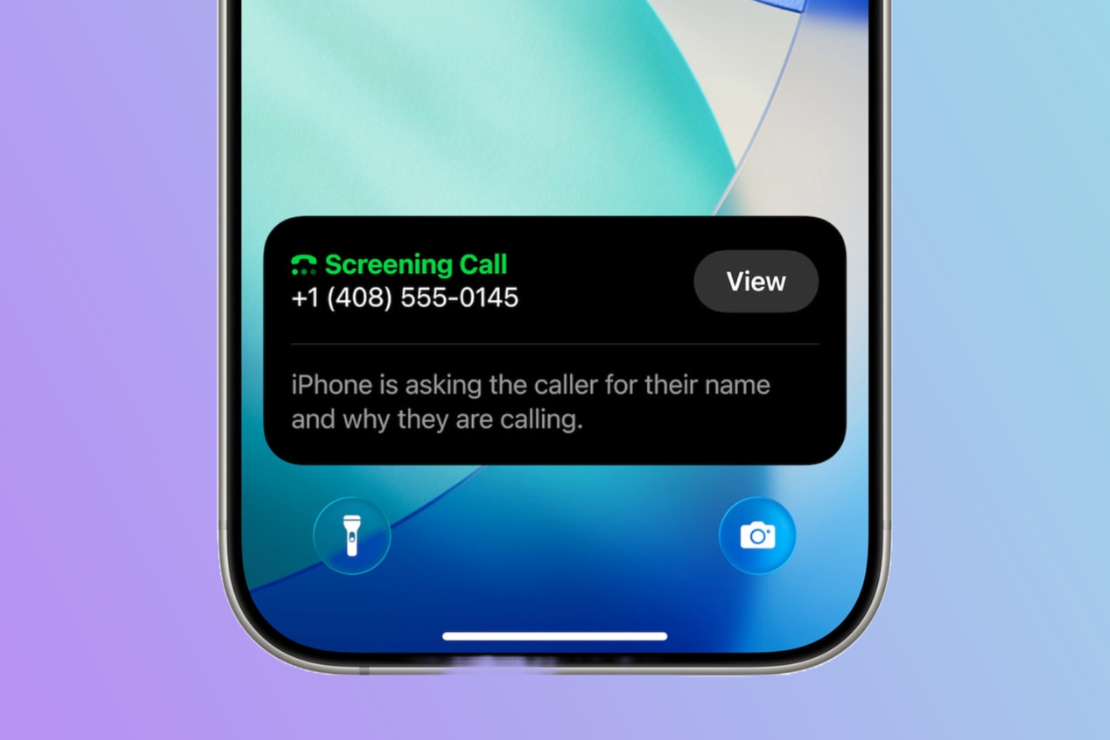
AT A GLANCE
- Apple’s iOS 26 adds a “Screen Unknown Callers” feature.
- Siri-style AI asks callers to state their name and purpose.
- Works only on iPhone 11 and newer models.
- Users report mixed results especially with delivery and service calls.
Annoyed By Junk Calls? Try The New iOS 26 Call Screen Feature– Here’s How To Use It
Apple’s latest iPhone software, iOS 26, brings a welcome feature for anyone sick of spam calls. The new call screening tool acts as a virtual gatekeeper, filtering out unknown numbers and robocalls before they interrupt your day.
To activate it, users must first update to iOS 26 (available on iPhone 11 and newer). Then go to Settings → Apps → Phone → Screen Unknown Callers.
Three options appear: Never, Silence, and Ask Reason for Calling. The middle option lets Siri ask unfamiliar callers for their name and reason before deciding whether to connect.
Some users have found the feature missing until they adjust their region and language settings, suggesting it’s still rolling out across different markets.
How the iPhone Call Screen Works
When a call comes from an unrecognized number, Siri intercepts it with a short prompt: the caller must identify themselves and explain their purpose. The iPhone then transcribes the response in real time, letting users decide whether to pick up, reply with a preset message, or ignore it entirely.
The interface even allows you to send automated replies such as “I’ll call you later” or “Send more information,” all spoken by Siri’s voice assistant.
Mixed Reviews from Early Users
While many say it’s a lifesaver against telemarketers, others note hiccups. Some legitimate calls, like from delivery drivers or mechanics, can be mistakenly screened out when callers hang up too soon.
A few users, including Associated Press reporters, have praised how seamlessly it blocks spam. Still, others report confusion when callers give their name instead of the user’s, causing accidental pickups.
If it’s not working out, you can disable call screening at any time.
Apple Playing Catch-Up
Apple’s move follows Google’s lead Pixel phones have had a similar screening option for years. Google’s feature even hangs up on detected spam automatically and recently expanded to Australia, Canada, and Ireland.
Meanwhile, Samsung’s Galaxy phones offer a comparable “Bixby text call” function for Android users.
Whether Apple’s late entry can perfect the feature remains to be seen. For now, it’s a small but satisfying step toward making your phone behave less like a telemarketer’s dream and more like, well, a phone.